Built for UPS Store owners & independent print shops
Corporate moves slow.
Your storedoesn’t have to.
Price the job. Find the box. Finish the photo. StorePro brings the tools your team reaches for all day into one place. Allowlisted on your UPS Store POS, opening automatically every day—and ready on your other computers, tablets, and phones.
Your first month is free. Built by a UPS Store owner.
Plus print job tracking, inventory, and tariff code lookup to keep your day moving.
- Allowlisted on UPS Store POS
- Opens automatically every day
- Computers, tablets, and mobile
Start with the question you hear all day
“How much?”
Keep the sale moving.
Live prices. Right on your POS.
Open the allowlisted app and compare quantities, paper, and finishing while you’re talking to the customer. Your store’s rates and volume tiers do the math.
Give them something to say yes to.
Build an itemized estimate or invoice, add the customer’s details, and print a professional copy. Save it for the next conversation.
Print job tracking
Your print jobs deserve better
than sticky notes.
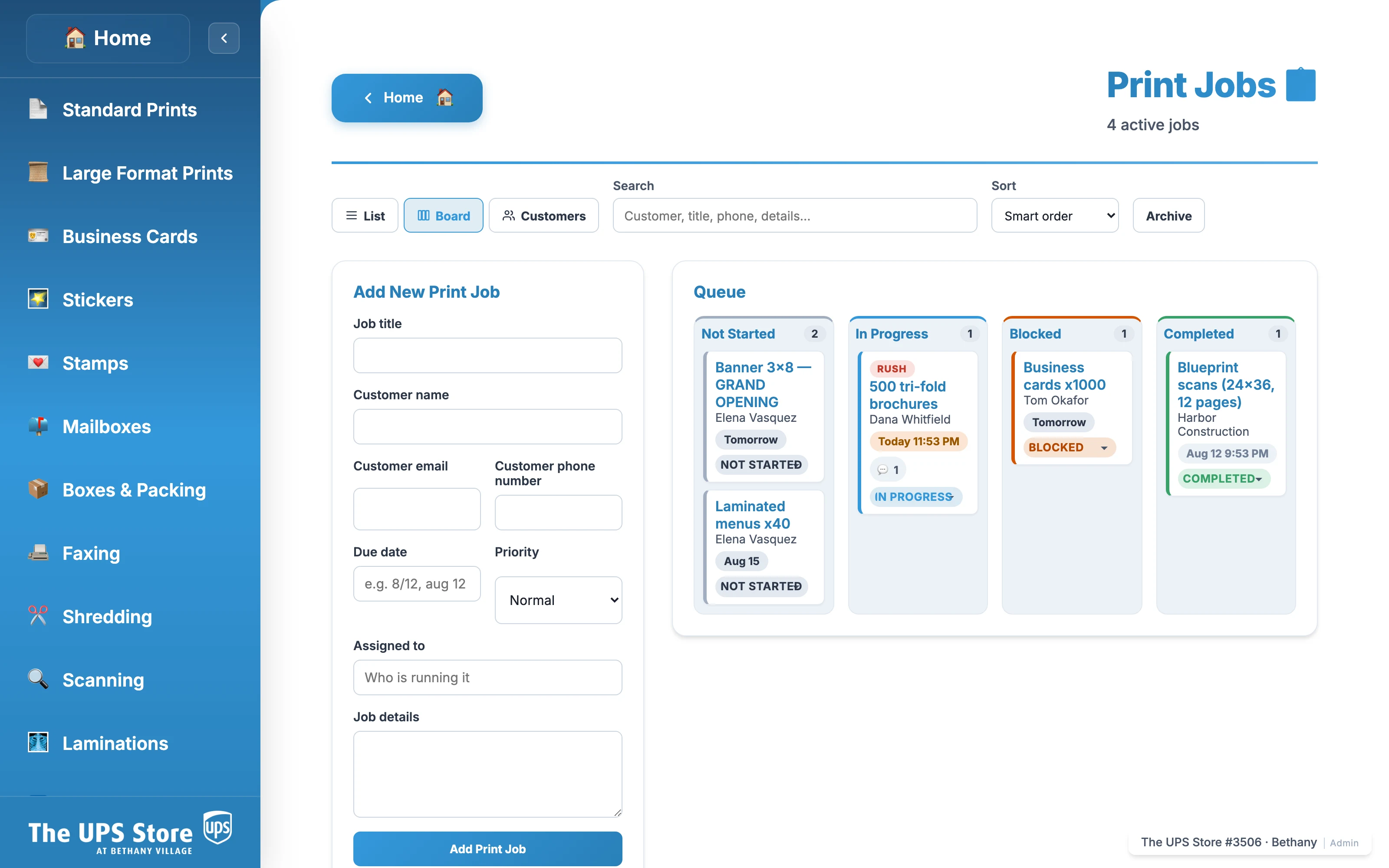
Customer instructions on one sticky note. A pickup date on another. Keep every print order’s due date, production notes, customer details, and rush flags in one shared queue—from the first conversation to the pickup shelf.
- Print queue in list and board views
- Print-job tickets for the shelf
- Customer print-order history
- Overdue and near-due email alerts
The shift changes. The print job stays on track.
Inventory, in its own place
The next print job
shouldn’t end at an empty shelf.
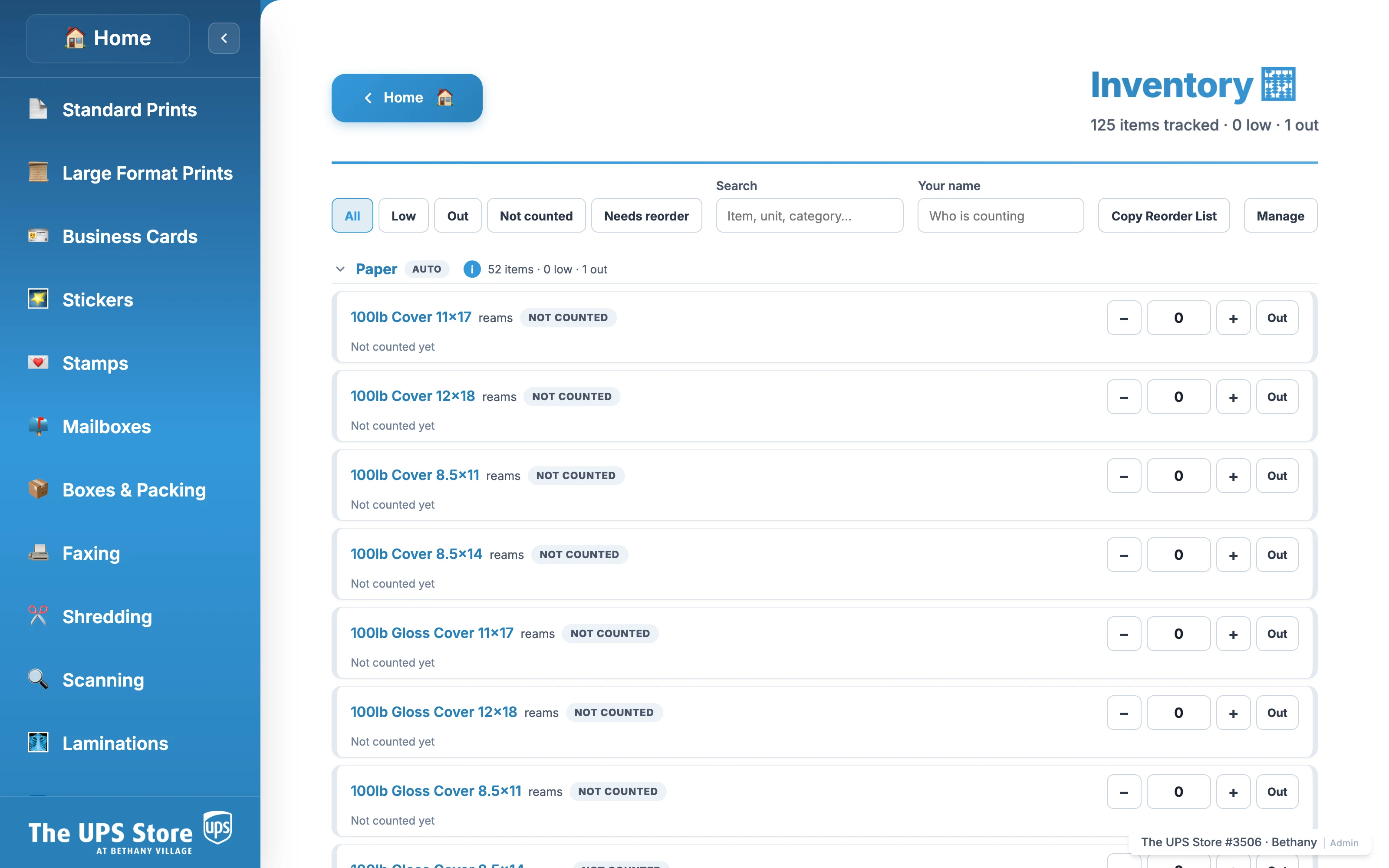
Paper, rolls, sticker sheets, boxes, and lamination pouches: keep the supplies your store depends on in one shared inventory.
- Start from your service catalog
- Record counts across devices
- Set low-stock thresholds
- Prepare a supplier reorder list
Your team does the counting. StorePro keeps the quantities and reorder signals organized.
And there’s more
at your fingertips.
The little jobs between the big jobs deserve better tools, too.
The right crop.
The digital file.
The next step, ready.
Crop and frame for passport and ID specifications around the world. Choose from 21 country presets, refine the result, and download a digital photo ready for the customer. Use studio-white background tools where the destination allows.
Need printed copies, too? Make a printable photo sheet and put your office copier to work with compatible photo paper. Use the equipment you already have instead of adding a dedicated photo printer.
Always review the finished photo against the destination’s requirements. Check your copier’s media compatibility and the printed result; acceptance is not guaranteed.
Item dimensions → a packing plan
An awkward item.
A much easier answer.
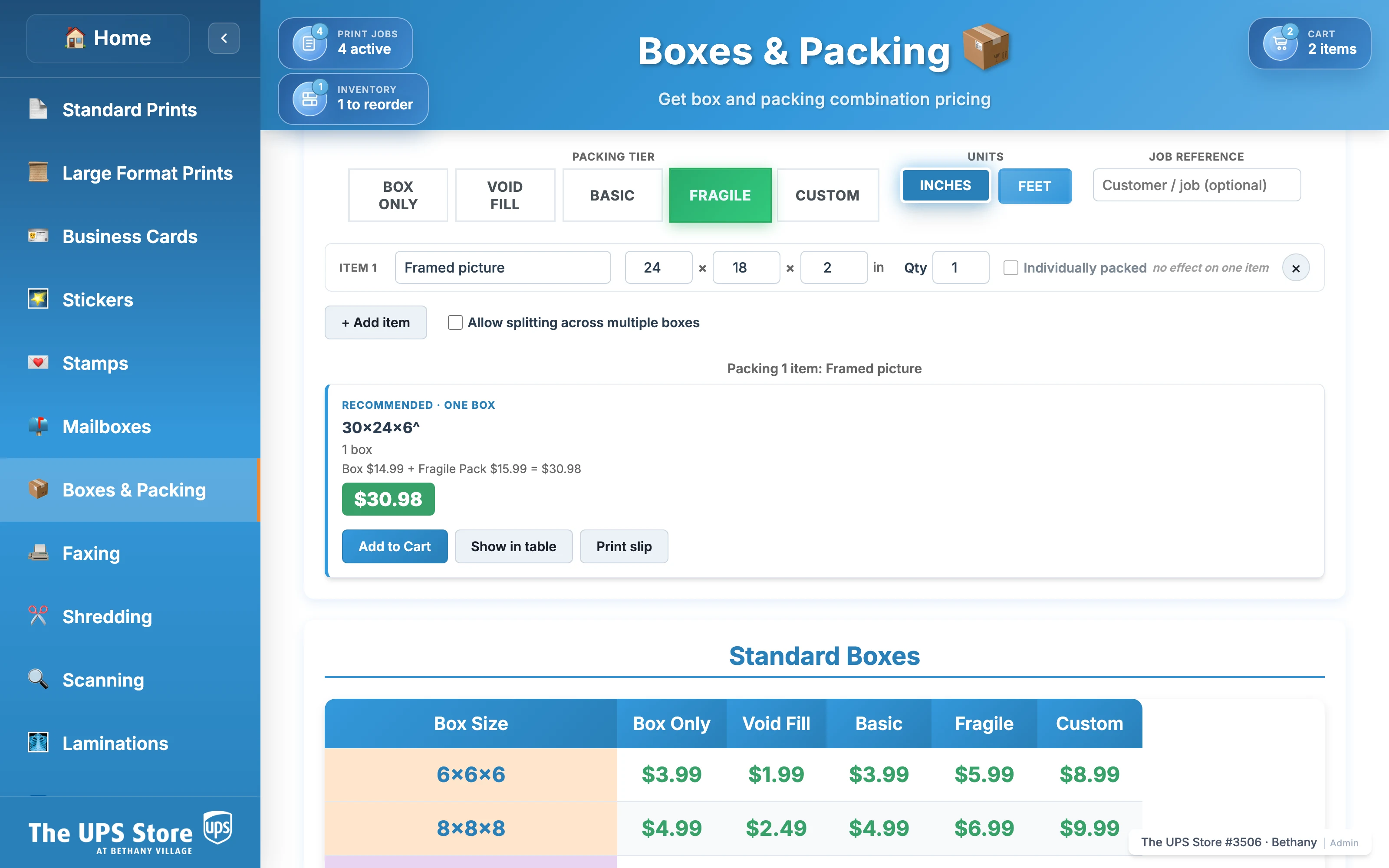
Enter the dimensions and choose a packing level. Get recommendations from your store’s box catalog, with your box and packing prices together.
When one standard box won’t do, explore split, telescoped, and custom options. Less measuring the same shelves. More moving the parcel along.
See the recommender in StorePro
 View full-size screenshot ↗
Your cutter has a layout.
Now your files do, too.
Drop in the customer’s business-card artwork. Arrange it on a sheet using a saved layout that matches your cutter, then generate the PDF for printing.
Start from a JPG, PNG, or PDF. Reuse the setup for the next order instead of rebuilding the same sheet from scratch.
Less searching.
More shipping.
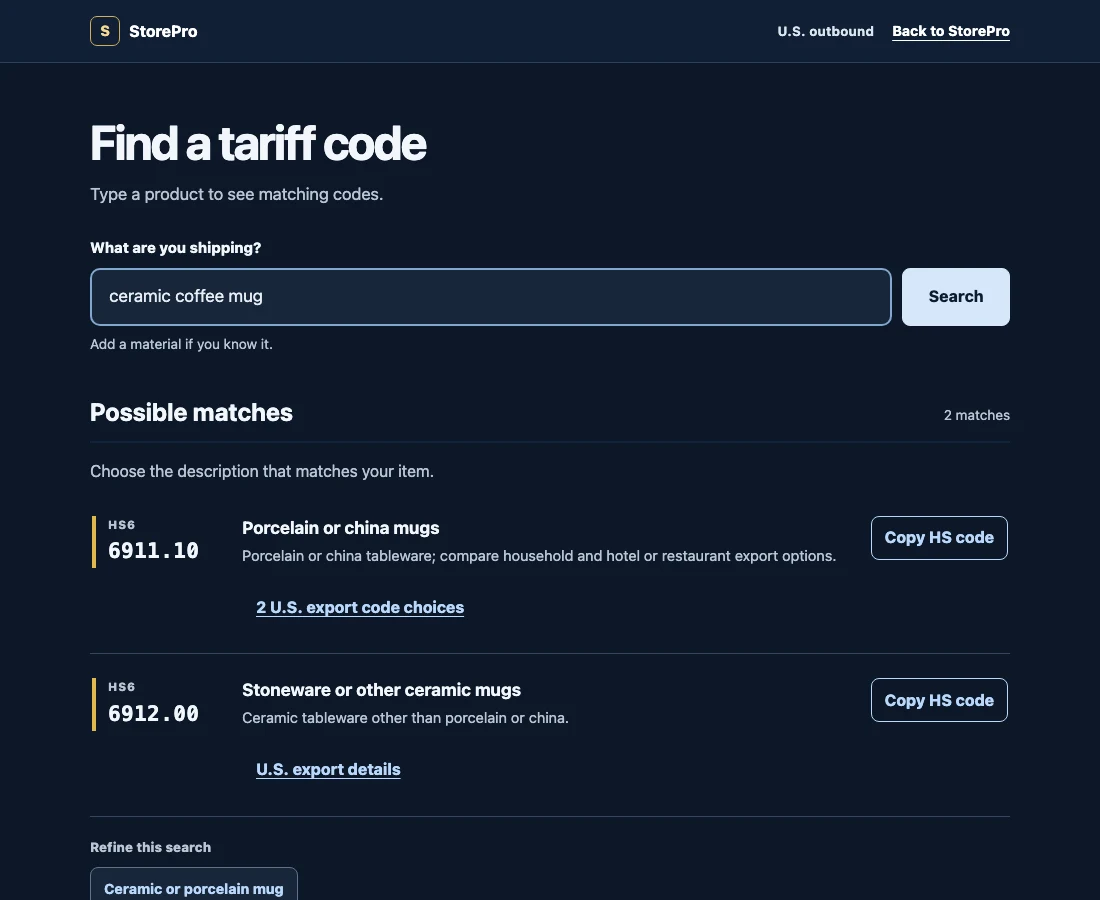
Look up tariff codes right on your POS while preparing an international shipment. Describe what’s in the box, review the matches, and copy the code—all without leaving the counter or losing your place in the sale.
Go beyond a quick Google search. Built-in U.S. Census reference data and product-specific refinements help you check the details that matter for accurate code selection, instead of relying on a search result alone.
Help prevent coding mistakes that can lead to shipment delays and customs issues. Less time searching, less avoidable paperwork—and faster service for the customer in front of you.
For U.S. outbound shipments. Review every match; accuracy and customs clearance aren’t guaranteed. HS codes and U.S. Schedule B export details—not destination-country import codes or duty estimates.
Built behind a real counter.
Not in a boardroom.
StorePro was built by a UPS Store owner to solve the things a shift actually asks of you. The next useful idea might be the one your team sends in. We’ll build custom features on request within a week.
Clear the counter. Keep the details.
Retire the pricing sheets
taped to your till.
No more hunting through binders or asking who remembers the latest rate. Give every associate the same store prices, services, and customer details in one place.
The professional platform you should’ve been given in the first place.
Pricing that fits your store
Small jobs should pay. Big jobs should stay.
Set minimums for short runs and volume tiers for bigger orders. Keep your paper stocks, finishing options, and service prices consistent across the team.
Explore the service menu
Scroll through the full menu. Pricing tools, vendor catalogs, and reference material are grouped separately; your store can hide services it doesn’t offer.
Price and prepare at the counter
- Standard Prints
- Large Format Prints
- Stickers
- Business Cards
- Scanning
- Graphic Design
- Stamps
- Mailboxes
- Boxes & Packing
- Faxing
- Shredding
- Laminations
- Passport Photos
- Booklet Binding
- Big Heads
- 3D Prints
Discover products to source
- Signs
- Banners & Flags
- Apparel
- Adhesive Graphics
- Display & Events
- Vehicles
- Calendars
- Postcards
- Brochures & Flyers
- Announcement Cards
- Bookmarks
- Door Hangers
- Envelopes
- Event Tickets
- Greeting Cards
- Hang Tags
- Magnets
- Menus
- NCR Forms
- Custom Notepads
- Table Tents
- Product Boxes
Keep a reference close by
- Industry Norms
Vendor discovery
You don’t have to make it in-house to sell it.
Bring 4over, Signs365, and more vendor catalogs together on your store’s POS and back-office computer. Discover banners, apparel, displays, and other products without losing the customer conversation. Use your store’s pricing tools to prepare customer estimates; vendor galleries link out for product details and ordering.
Estimates & repeat orders
“Same as last time” should be easy.
Search saved estimates and invoices, reopen the details, or duplicate a past order as a starting point. Recorded prices stay with the saved invoice; review them before using it for a new sale.
Owner visibility
You can check in without being there.
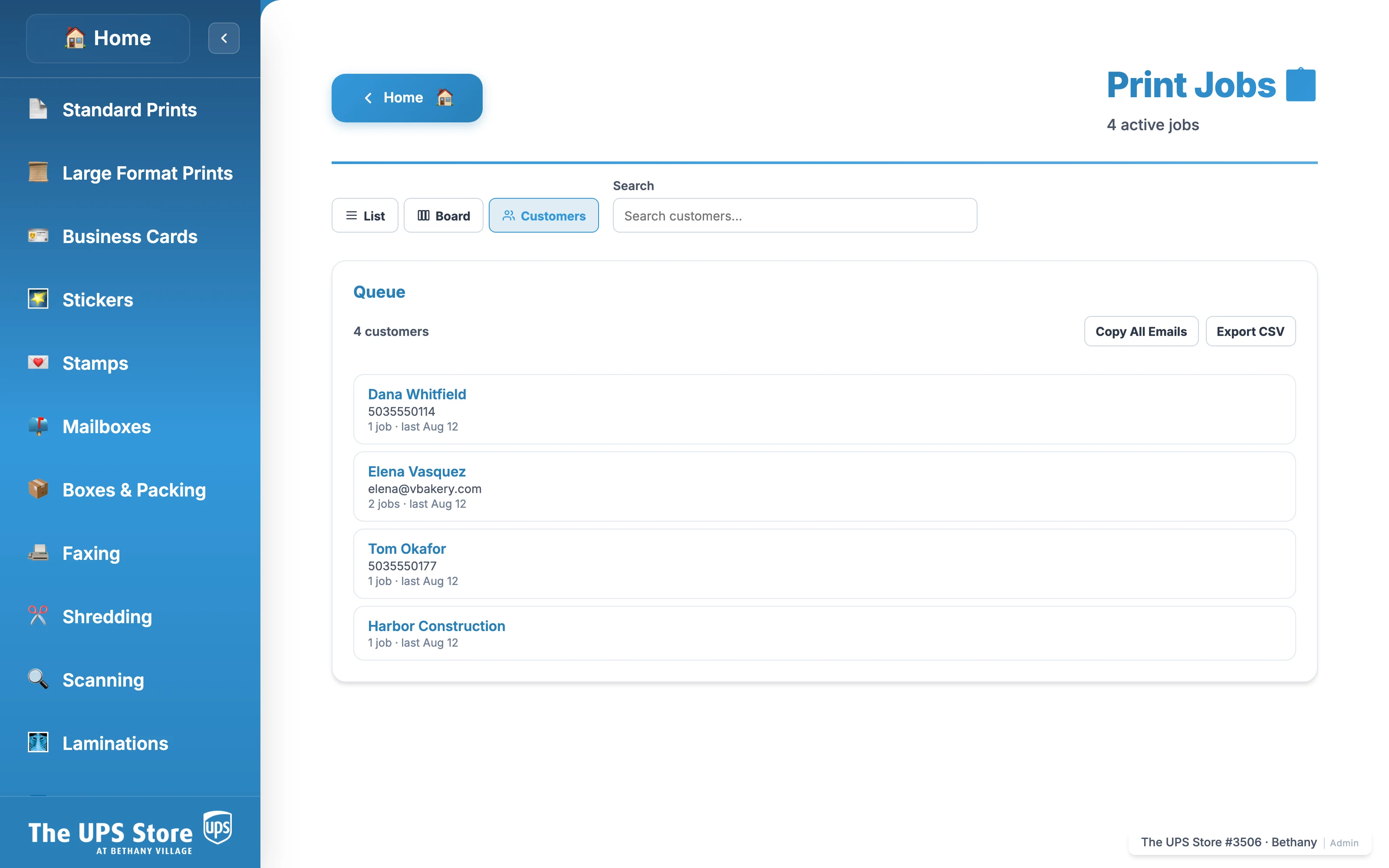
Review store activity and service usage, see customer job history, and export records to CSV. Open the same store from your phone or browser when you’re away from the floor.
See the customer directory
 View full-size screenshot ↗
Make it yours
Your store. Your prices.
A head start, not a blank page.
Start with a working setup.
Try the built-in defaults and explore the tools. Adjust your prices before using them for customer quotes.
Bring your own way of working.
Edit prices, paper stocks, services, and labels. Want help entering your price sheet? Talk to us.
Give the next store a head start.
Copy pricing from another store you own, then make local adjustments. Each location keeps its own identity and records.
Already where you work.
Allowlisted as an app on UPS Store POS tills and set to open automatically every day. Open the same store on your back-office computer, another laptop, any tablet, or your mobile browser. StorePro works alongside your payment system.
Pricing
One price per store. The first month is free.
No tiers, no per-seat charges, nothing held back behind an upgrade. Every store gets everything StorePro does, on every device you sign in from — and right now, at launch pricing.
Your first month is completely free. Send us your price sheet, run a full month at the counter, and pay nothing while you do.
Save 67%
Your first store
Everything StorePro does, at one counter.
$20 per month
Save $40 per month on the $60 list price, for a limited time.
Starts after your free first month.
Save 67%
Each additional store
Every location on the same owner account.
$12 per month
Save $24 per month on the $36 list price, for a limited time.
Each location keeps its own prices, jobs and inventory — and you see them all from one login.
One subscription for the tools your store uses throughout the day.
- Pricing, invoices, passport tools, card templates, box recommendations, tariff code lookup, job tracking and inventory
- Your POS till, an iPad and any browser — nothing extra per device or per associate
- Self-editable prices, with help setting up from your price sheet
- Share requests directly with the person building StorePro
Per store, per month, in US dollars · Billed to the owner account, never the counter
Still building.
Still listening.
These are upcoming ideas, not available features or promised release dates. Tell us what your store needs.
Photo delivery, with your follow-up.
The finished attachment, your editable message, your Google review link, and a copy to the store—all in one customer email.
A storefront with your name on it.
A branded customer-facing site with online payments, connected to your store.
Fewer steps between label and printer.
Touchless AutoPrint for customer-submitted shipping labels, with less email back-and-forth.
A few things you might be wondering.
Does it really run on our POS?
Yes. StorePro is allowlisted as an app on UPS Store POS tills and opens automatically each day. It’s also accessible from your back-office computer, other computers, tablets, and mobile browsers—alongside the payment system you already use.
How do our prices get in?
Use the built-in pricing editor, or contact us for help with your price sheet. Start from defaults, then review and adjust them for your store before quoting customers.
Do we need new hardware?
No new computer is required to use StorePro. Open it on your existing POS browser, iPad, laptop, or phone. Printing and photo workflows still use your store’s printer and camera setup.
Are the passport and business-card tools available now?
Passport framing and background tools are available now, and business-card template sheets are in beta. The automatic customer email with your review link and store CC is planned, not yet available.
Does the passport tool guarantee acceptance?
No. Review the source image and finished photo against the destination’s current requirements, including whether digital background changes are allowed. Framing and editing tools help with preparation; they do not guarantee acceptance.
What does it cost?
Your first month is free, followed by a per-store subscription. See the launch rates above. Continued use after the trial requires an active subscription.
Can other stores see our prices or customers?
No. Each store’s pricing, customers, and job history are isolated from other stores. Owners with multiple locations manage them through one account.
Can we take our data with us?
Your pricing, customer information, and job history are exportable. See the privacy policy for what we store, how deletion works, and your options.
What if we need a tool you don’t have?
Tell us what the workflow looks like. Use in-app Feedback or contact support. We’ll build custom features on request within a week.
Your next shift
could run a little differently.
Start with a quote. Discover what else your store can do.
First month free. Your store’s tools, in one place.